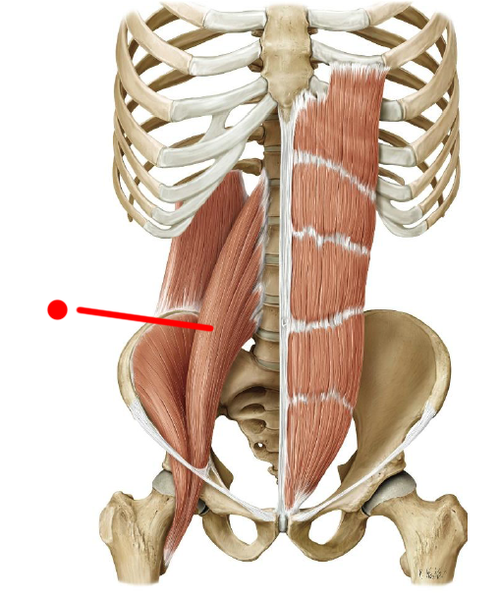
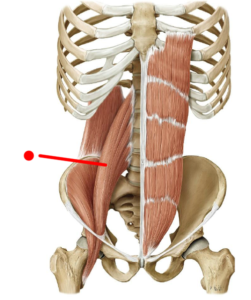
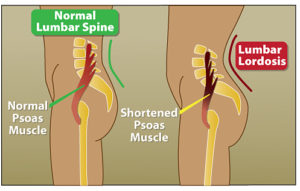
Psoas is a strong and powerful muscle, yet often overlooked, and tt can be responsible for a host of ailments.
The Psoas muscle originates from the T12 and Lumbar spinal segments, where it blends in with fibers of the diaphragm (your primary breathing muscle).
It then passes through the deep core, crosses the hip and inserts to the Femur. It is responsible for hip flexion, and can be involved in low back issues, as well as respiratory conditions.
Have you noticed that you’ve been experiencing shallow breathing? This may mean if Psoas is wreaking havoc, it’ll have a direct effect on your breathing, making it shallower.
Sitting for prolonged periods – Eg At a desk for work – can cause the Psoas muscle to become tight. This can result in anterior rotation of the pelvis, and can make it difficult to engage your Gluteal muscles for stability.
During your osteopathic consutlation, your Osteopath will not only work on the muscles and joints that are causing your pain, but also check your feet, ankle, knees and hip biomechanics, as they will also influence your low back.
One exercise that you can do at home for releasing this tricky muscle is the lunge exercise. Make sure to:
Tuck your bottom in (posteriorly rotate your pelvis)
Ease into it, by breathing in to the stretch (increasing the stretch when you exhale)
Hold for 30-45 seconds, repeat 2-3 times during the morning and evening.
If you need a deeper stretch:
Lean forward with your hips
Rotate your upper body to the same side of your back leg, and raise both arms to the sky
If you have any questions or need advice, feel free to give the clinic a call on 9370 4033, or book your appointment HERE.
Using a heat pack is an easy and effective way to provide temporary pain relief. Heat therapy is commonly recommended to musculoskeletal discomfort, as it help relax muscles, improve circulation, and ease muscle ...
read more
Injury prevention is every athlete’s dream. Imagine being able to do what you love—exercise, sport, outdoor activities—without getting injured. While that sounds ideal, the reality is a bit more complex.
Websites store cookies to enhance functionality and personalise your experience. You can manage your preferences, but blocking some cookies may impact site performance and services.
Essential cookies enable basic functions and are necessary for the proper function of the website.
Name
Description
Duration
Cookie Preferences
This cookie is used to store the user's cookie consent preferences.
30 days
These cookies are needed for adding comments on this website.
Name
Description
Duration
comment_author
Used to track the user across multiple sessions.
Session
comment_author_email
Used to track the user across multiple sessions.
Session
comment_author_url
Used to track the user across multiple sessions.
Session
Google reCAPTCHA helps protect websites from spam and abuse by verifying user interactions through challenges.
Name
Description
Duration
_GRECAPTCHA
Google reCAPTCHA sets a necessary cookie (_GRECAPTCHA) when executed for the purpose of providing its risk analysis.
179 days
Google Tag Manager simplifies the management of marketing tags on your website without code changes.
Name
Description
Duration
cookiePreferences
Registers cookie preferences of a user
2 years
td
Registers statistical data on users' behaviour on the website. Used for internal analytics by the website operator.
session
Statistics cookies collect information anonymously. This information helps us understand how visitors use our website.
Google Analytics is a powerful tool that tracks and analyzes website traffic for informed marketing decisions.
ID used to identify users for 24 hours after last activity
24 hours
_gat
Used to monitor number of Google Analytics server requests when using Google Tag Manager
1 minute
_gac_
Contains information related to marketing campaigns of the user. These are shared with Google AdWords / Google Ads when the Google Ads and Google Analytics accounts are linked together.
90 days
__utma
ID used to identify users and sessions
2 years after last activity
__utmt
Used to monitor number of Google Analytics server requests
10 minutes
__utmb
Used to distinguish new sessions and visits. This cookie is set when the GA.js javascript library is loaded and there is no existing __utmb cookie. The cookie is updated every time data is sent to the Google Analytics server.
30 minutes after last activity
__utmc
Used only with old Urchin versions of Google Analytics and not with GA.js. Was used to distinguish between new sessions and visits at the end of a session.
End of session (browser)
__utmz
Contains information about the traffic source or campaign that directed user to the website. The cookie is set when the GA.js javascript is loaded and updated when data is sent to the Google Anaytics server
6 months after last activity
__utmv
Contains custom information set by the web developer via the _setCustomVar method in Google Analytics. This cookie is updated every time new data is sent to the Google Analytics server.
2 years after last activity
__utmx
Used to determine whether a user is included in an A / B or Multivariate test.
18 months
_ga
ID used to identify users
2 years
_gali
Used by Google Analytics to determine which links on a page are being clicked
30 seconds
Marketing cookies are used to follow visitors to websites. The intention is to show ads that are relevant and engaging to the individual user.
Google Maps is a web mapping service providing satellite imagery, real-time navigation, and location-based information.
Share this news article online